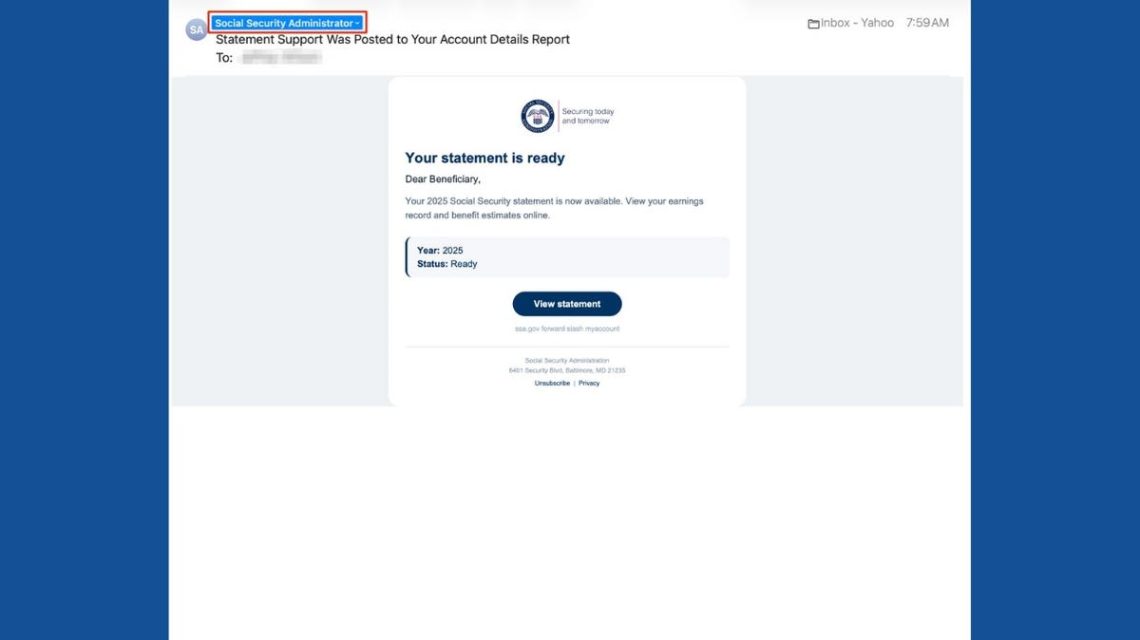
Emails appearing to originate from Social Security often command attention. They reference your retirement benefits and accumulated earnings, making them important. Scammers exploit this by sending fraudulent emails that mimic official Social Security communications.
Recognizing a Phishing Email
Recently, a suspicious email circulated, appearing professional with a Social Security Administration (SSA) logo and a button labeled ‘View Statement.’ However, a close look at the sender’s email address revealed no federal connection, striking as a critical clue.
In early 2026, the Social Security Administration’s Office of the Inspector General noticed a rise in such fraudulent emails. Understanding these scams is crucial for safeguarding your information.
Spotting Warning Signs
Typically, these emails arrive with a subject line like “Statement Support Was Posted to Your Account Details Report.” They claim your Social Security statement for 2025 is ready, including a ‘View statement’ button. Scammers count on unsuspecting users to quickly engage with these messages.
However, examining the sender address often shows it comes from a domain unrelated to Social Security, a significant red flag. Legitimate SSA emails originate from government domains.
Why These Scams Appear Credible
The scam’s believability lies in minimal pressure. Instead of urgent demands, they offer a preview of your Social Security statement, something recipients find useful. Such emails often begin with a generic “Dear Beneficiary,” despite being sent to an inbox with a specific recipient.
Additionally, the use of SSA logos and government-style formatting boosts credibility without verifying sender authenticity.
Social Security’s Legitimate Emails
The SSA sends genuine emails reminding individuals of available statements around their birthdays and other notices. Scammers mimic these communications to capitalize on their authenticity.
Verifying Email Authenticity
- Check the sender’s full email address by expanding message details.
- Preview links without clicking them if unsure.
- Visit the official SSA site or call 1-800-772-1213 to verify a message directly.
Accessing Your Social Security Safely
Use your browser to visit ssa.gov/myaccount directly. Sign in to your my Social Security account using supported services like Login.gov or ID.me. Always verify through official channels.
Protecting Yourself from Scams
- Avoid unexpected email links; access SSA content independently.
- Enable strong authentication on accounts and emails.
- Use reliable antivirus software to detect threats.
- Do not share sensitive information through suspicious emails.
- Regularly monitor your Social Security account for inaccuracies.
- Limit accessible personal data by removing it from online directories.
- Report fraudulent emails before deleting them.
Responding to a Scam Click
If you clicked a suspected scam link:
- Close the site and avoid downloading files.
- Change your passwords using a credible site.
- If your Social Security number was shared, use IdentityTheft.gov for assistance.
- For downloaded files, perform an antivirus scan promptly.
If financial details were exposed, contact your bank and report to the FBI’s Internet Crime Complaint Center and FTC.
Kurt Knutsson emphasizes careful inspection of sender details to avoid phishing scams. Genuine SSA emails should be verified through official channels to prevent fraud.
For additional tech tips and scam alerts, visit CyberGuy.com.
 Parker McCollum’s Love for the Outdoors and Family
  Pentagon Confirms Deployment of US Space Weapons as UK Develops Space Cleanup Technology
  Struggles with Social Media Beauty Filters for Kids and Teens
  Indiana University Northwest Students Develop Tree Cataloging App