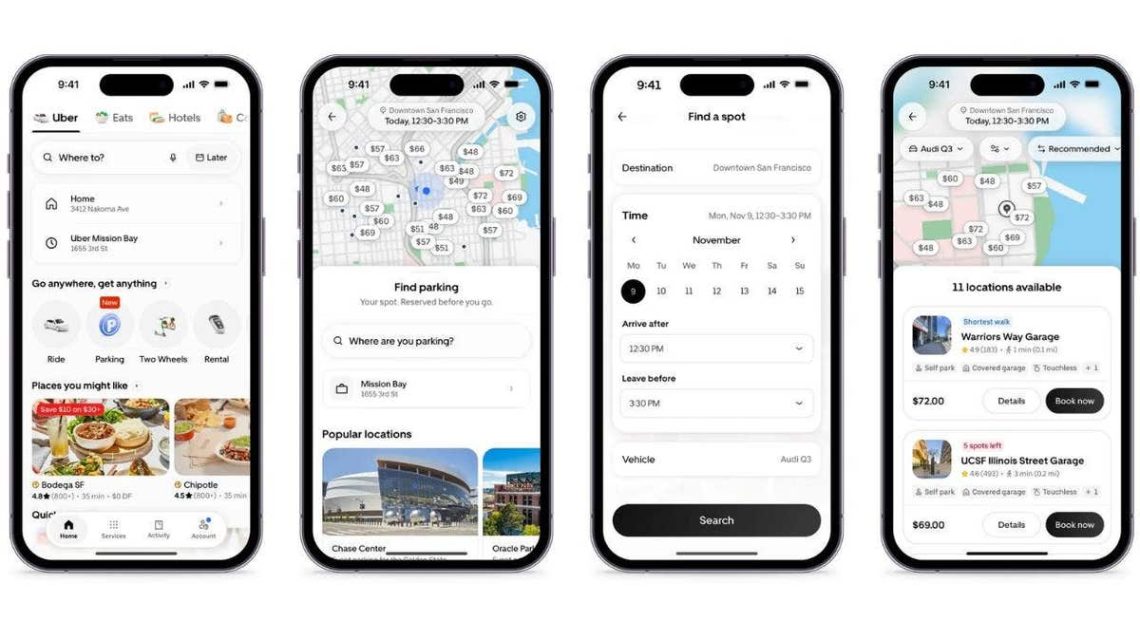
Uber has unveiled a new feature called Uber Parking, designed to simplify parking by allowing users to reserve spots through their app. This development aims to make parking more convenient, especially in busy areas.
Introducing Uber Parking
On November 9, Uber announced the launch of Uber Parking. This new feature emerges from Uber’s acquisition of SpotHero, a renowned parking reservation service. By integrating SpotHero’s network, Uber now offers access to over 13,000 parking garages and lots spanning more than 400 cities in the U.S. and Canada.
With Uber Parking, drivers can easily search for parking spots, see upfront prices, and reserve their spaces ahead of time. This can help avoid the stress of circling blocks in search of a spot and provide a clear comparison of parking costs.
How to Reserve a Parking Spot
Reserving a parking spot using the Uber app is straightforward. Follow these steps:
- Open the Uber app on your smartphone.
- Select the new Parking icon on the home screen.
- Enter your desired destination.
- Choose the date and time you need parking.
- Explore the interactive map to view available garages and lots.
- Compare upfront prices to find the best option.
- Use filters to refine your search by garage type, such as self-parking or valet service.
- Enter details like your vehicle’s make, model, and license plate number.
- Confirm your reservation and pay via the payment methods available in your Uber Wallet.
Once the reservation is made, a digital parking pass is available within the Uber app. Depending on the facility, you’d either scan a QR code or the system recognizes your license plate for entry. Some facilities allow you to extend reservations, and cancellations are possible depending on the location’s terms.
Availability and Expansion
Uber Parking initially launched in 15 U.S. cities: Atlanta, Austin, Boston, Chicago, Dallas, Denver, Los Angeles, Miami, Nashville, New York City, Philadelphia, San Diego, San Francisco, Seattle, and Washington, D.C. Although SpotHero operates in over 400 cities, Uber Parking is gradually rolling out across this network. Users might not immediately see the Parking feature; ensuring the app is updated can help.
Uber One Member Benefits
Uber One members can earn back 10% in credits on qualifying parking reservations. For example, spending $30 on parking could earn $3 in Uber One credits. These credits can be applied to future Uber rides or Uber Eats orders. However, check if the reservation qualifies for these benefits, as the offer applies to specific bookings only.
Future Plans for Robotaxis
Uber views parking garages as potential waiting areas for future autonomous taxis. When not in use, driverless vehicles could station at these facilities instead of idling on streets, lessening traffic congestion. This could be a strategic move to make autonomous transportation more efficient.
Making Parking Reservations Work for You
For the end-user, the main advantage is evident. By booking your parking in advance, you save time and reduce hassle. However, consider these factors before confirming a reservation:
- Ensure the parking cost aligns with nearby alternatives.
- Verify any height restrictions if driving a large vehicle.
- Review cancellation policies for flexibility.
- Beware of parking scams, relying on the Uber app for secure transactions.
- Use digital aids like Google or Apple Maps to remember your car’s location.
By integrating parking into its app, Uber is expanding its services beyond ridesharing. Whether you’re taking an Uber or driving yourself, the app remains an essential part of your travel planning. As Uber’s robotaxi strategies progress, the importance of efficient parking solutions becomes even more significant.
 The Transformation of Brussels Sprouts
 Amazon Enlists NYC Customers Against City Council Bill
 The Controversy Surrounding Jensen Huang and Nvidia
 GAO Finds Federal Agencies Lacking in Cybersecurity Planning
 Grand Theft Auto VI Sparks Relationship Challenges
 AI and Robotics Redefining Workforce Skills