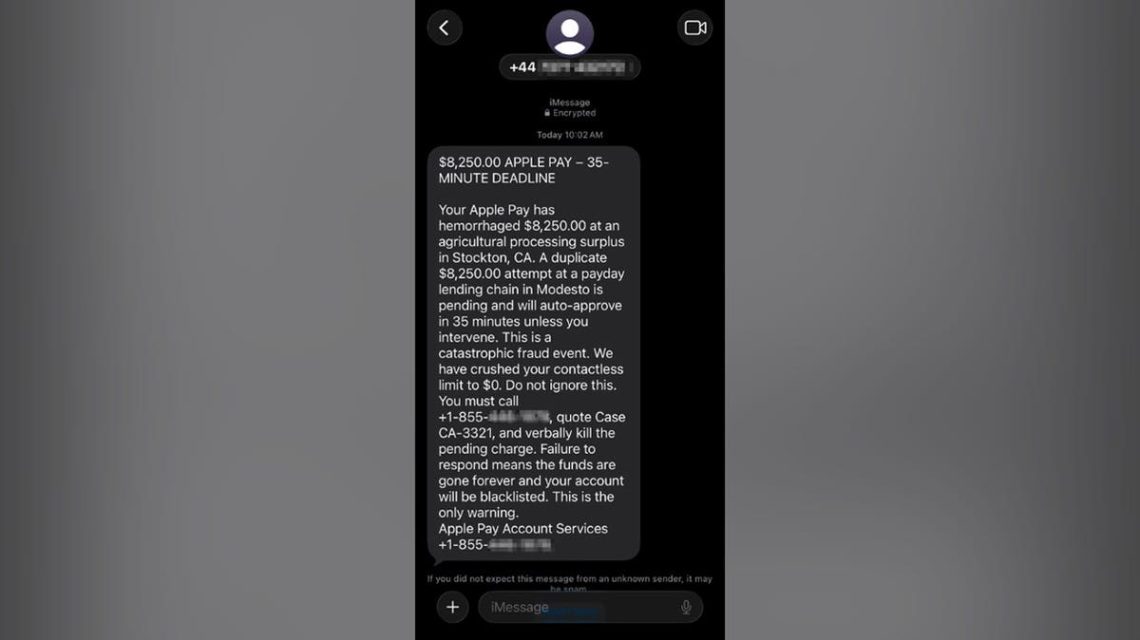
Paul C., based in Washington, D.C., reacted wisely when he received a text message claiming Apple Pay had charged him significant amounts of money. The message stated that $8,250 had been processed, with another $8,250 set to go through soon. Such messages aim to cause panic, but Paul acted correctly by not responding and forwarding the text to professionals for analysis.
Identifying Red Flags in Scam Texts
Scam messages often exhibit several warning signs intended to deceive recipients:
- Mismatched Numbers: The message Paul received originated from a U.K. number. It instructed him to call a separate toll-free number in the U.S., which is atypical for legitimate communications.
- False Trust through Branding: The use of Apple Pay branding and terms like ‘Encrypted’ makes the message appear official, but legitimate messages would provide more specific details.
- Panic-inducing Charges: Mentioning large sums and deadlines creates urgency, discouraging recipients from verifying the information independently.
- Dramatic Language: Words like ‘hemorrhaged’ and ‘catastrophic’ aim to create fear, whereas genuine alerts use straightforward terms.
- Nonsensical Merchant Details: Unclear descriptions of transaction locations or merchants often signal a scam.
- Contradictory Statements: Claims in scam messages may conflict, further indicating their fraudulent nature.
- Instructions Leading to Scammers: The message instructs Paul to call immediately, ignoring official verification methods.
Understanding the Scam Mechanism
The scam text aims to provoke a call, giving scammers control. They may request personal information or encourage the installation of remote-access apps to further exploit victims. Fake agents might even push for money transfers to supposed ‘secure’ accounts.
Validating Apple Pay Charges
When receiving such texts, avoid calling numbers in the message. Instead, verify charges by checking the Wallet app, the official bank app, or through customer service numbers found on the back of your physical card.
Reporting Scam Messages
Before deletion, take a screenshot of the suspect message. On iPhones, you can report the message as spam directly in the Messages app or by emailing it to [email protected]. Blocking the sender and utilizing 7726 (SPAM) forwarding can help carriers recognize similar scams.
Steps to Protect Yourself
- Pause and Verify: Always check transaction alerts through recognized channels without haste.
- Avoid Sharing Sensitive Information: Never provide personal verification codes or remote access to unknown parties.
- Use Reliable Security: Employ trusted antivirus software to guard against potential threats.
- Reduce Data Exposure: Consider using data removal services to limit your information’s accessibility online.
Responding to Scams
If interaction with a scammer occurs, immediately contact financial institutions to secure accounts and change compromised passwords. Removing remote-access software and implementing credit freezes can further safeguard against identity theft.
Have you encountered a scam text? Informing others helps raise awareness and prevent similar incidents.
 Democrats Block Data Center Bill in Senate
  Ambitious Future Cities: A Global Overview
  Washington’s AI Concerns and the Promised Technological Future
  Nate Bargatze Embodies Simplicity and Trust in New Ford Campaign
  OpenAI Delays AI Model Release Over Security Concerns
  OpenAI Halts Launch of New AI Model Due to Unexpected Actions